

Timing changes how a campaign performs. Instead of sending manually, WapBlaster lets you schedule broadcasts in advance so they arrive when your audience is most likely to engage. This guide shows how.
Step 1: Build your campaign
Create the campaign as usual with your audience and approved template. Scheduling is the final step before it goes out.
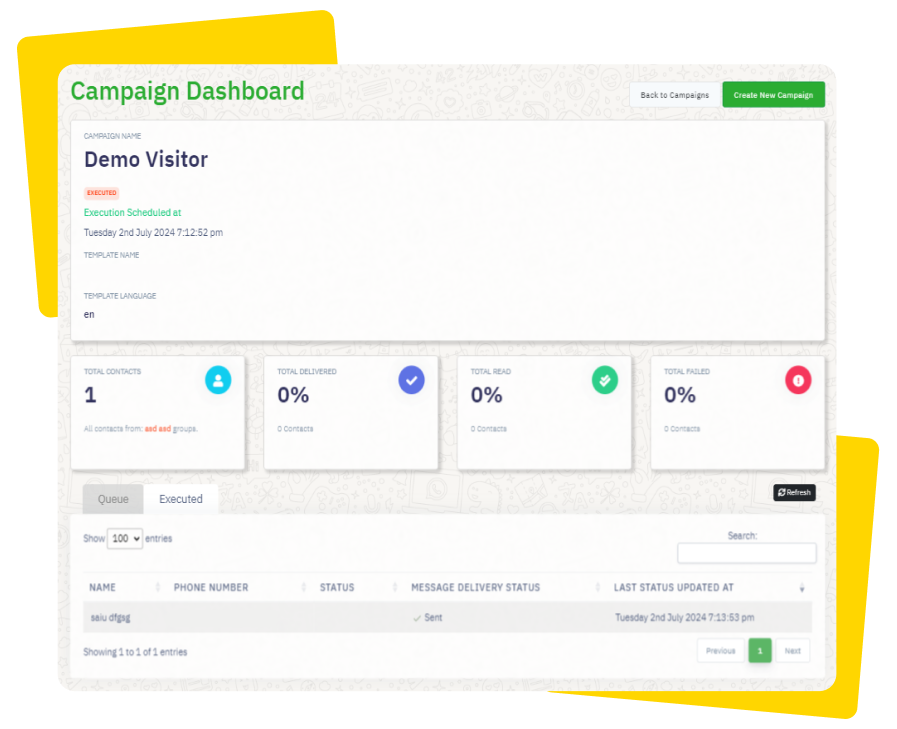
Step 2: Choose the send time
Instead of sending now, pick a future date and time. Consider your audience’s timezone and normal active hours.
Step 3: Avoid quiet and late hours
Schedule within reasonable hours so messages feel welcome rather than intrusive, and test different times to learn what works.
Step 4: Confirm the schedule
Review the audience, message and scheduled time, then confirm. The campaign will send automatically at the chosen moment.
Step 5: Review after it sends
Once delivered, check the results and compare against other send times to refine your timing strategy.
Helpful next reads
WhatsApp message scheduling guide, How to create a broadcast campaign, WhatsApp content calendar guide.
Frequently asked questions
Can I schedule WhatsApp campaigns in advance?
Yes. WapBlaster lets you build a campaign and choose a future date and time so it sends automatically when your audience is most likely to engage.
What is the best time to send a WhatsApp campaign?
It depends on your audience. Send within reasonable local hours, avoid early mornings and late nights, and test different times to find what works.
Can I review a scheduled campaign before it sends?
Yes. You can confirm the audience, message and scheduled time before finalising, and review the delivery results after it sends.