

IndiaMART WhatsApp Follow-Up Automation: A Compliant Sequence for More Replies
Most IndiaMART enquiries do not convert in one message. Buyers may be comparing suppliers, waiting for internal approval, checking specifications, or simply busy. A thoughtful WhatsApp follow-up process keeps the conversation useful without turning it into noise.
WapBlaster can place new IndiaMART contacts into a dedicated group and support scheduled campaigns for that group. The platform's IndiaMART automation guidance suggests a practical sequence on Day 1, Day 3, Day 7, and Day 14. The exact schedule should reflect your sales cycle, product value, and buyer intent. What matters is that every message adds value and stops when the customer has converted, declined, or opted out.
Start with an enquiry-specific welcome, not a generic campaign
The first message is a response to a live request, so it should acknowledge the enquiry and tell the buyer what happens next. Use the lead's name and requested product or service only when those details are available and accurate. Do not begin with a large broadcast-style catalogue, a long price list, or unrelated promotions.
Before building a nurture sequence, make sure the initial workflow is working. The IndiaMART lead automation setup guide explains how WapBlaster receives leads, maps fields into approved templates, creates labelled contacts, and gives the sales team a working record.
Build a four-touch follow-up sequence around useful decisions
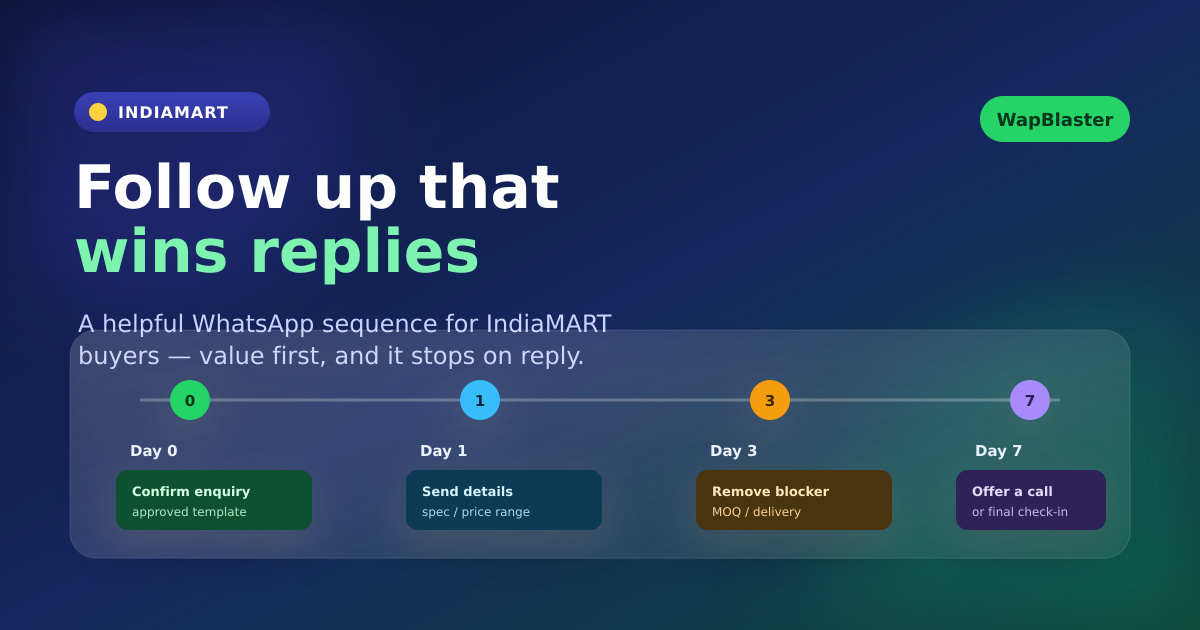
A follow-up sequence should help a buyer make progress. Here is a practical structure for many B2B and high-consideration enquiries. Adjust the timing and content to your actual sales process rather than treating it as a fixed rule.
Day 0: confirm the enquiry and open the conversation
Send the approved welcome template that confirms the requested item or service. Ask one qualifying question. The aim is to establish a two-way conversation, not to complete the sale in the first automated message.
Day 1: provide the most relevant next resource
Follow up only if the buyer has not already received the information from your team. Share a relevant specification sheet, product option, estimated price range, availability update, or a link to book a callback. Keep the message short and make the next action obvious.
Day 3: remove the main decision barrier
Use the third touch to answer a common question: minimum order quantity, delivery coverage, customization, warranty, sample availability, installation, or payment options. Sales teams should tailor this message by product category whenever possible.
Day 7: offer a human conversation
Some buyers need clarification rather than another document. Offer a call, video demonstration, quotation review, or an opportunity to share final specifications. This is a good point to route engaged leads to an available salesperson.
Day 14: make a respectful final check-in
If there has been no response and no active opportunity, send one last concise check-in only where it is appropriate under your messaging permissions and current WhatsApp policy. Give the buyer a clear option to reply later or stop receiving follow-up messages. Do not keep a silent lead in an endless automated loop.
Use approved templates and current policy rules
WhatsApp has rules for business-initiated messaging, including template approval and quality expectations. Before sending automated follow-ups, ensure the required templates are approved, accurately describe the message purpose, and are used in a way that complies with the current WhatsApp Business Messaging Policy. WapBlaster helps you use template-based automation, but your team remains responsible for the relevance and permission basis of each sequence.
IndiaMART lead data should not be treated as a reason to send unrelated marketing. Segment follow-ups by the enquiry itself. A buyer who asked for a packaging machine should receive packaging-machine information, not a general promotion for every category your company sells.
Segment leads before you schedule campaigns
Not every lead deserves the same cadence. Create segments based on product category, geography, order size, source, assigned salesperson, or conversation status. For example, a high-value industrial enquiry may need a human call within minutes, while a lower-consideration product enquiry may benefit from a concise automated product guide first.
WapBlaster's IndiaMART workflow can create a dedicated contact group for new leads. Use that group as a starting point, then move or tag contacts as their status changes. This makes it easier to prevent a customer who already received a quote from receiving the same introductory reminder again.
Set clear stop conditions
Automation should stop or change course when a lead becomes active. Define these operational rules before launching:
- Stop the sequence when the buyer replies and a team member takes ownership.
- Stop the sequence when the enquiry is marked won, lost, invalid, or not a fit.
- Pause generic follow-ups when a quote, meeting, or callback is scheduled.
- Honor opt-out requests and update contact preferences promptly.
- Review message performance and complaints, not only delivery volume.
These rules protect the customer experience and prevent your sales team from creating contradictory conversations.
Connect follow-up performance to sales outcomes
Track replies, qualified conversations, quotes issued, meetings booked, and orders—not just delivered messages. If a message delivers but generates no useful replies, it may be too generic, poorly timed, or irrelevant to the original enquiry. Test one change at a time: a stronger qualifying question, a clearer call to action, or a more relevant resource.
For ongoing lead ownership and status discipline, use the IndiaMART WhatsApp lead management guide. For campaigns aimed at properly segmented and eligible contacts, see WapBlaster's WhatsApp broadcast messaging solution.
Frequently asked questions
How many WhatsApp follow-ups should an IndiaMART lead receive?
There is no universal number. Use a short, value-led sequence that matches your sales cycle and stop when the buyer responds, converts, declines, opts out, or the follow-up is no longer relevant.
Can WapBlaster schedule follow-up campaigns for IndiaMART leads?
Yes. WapBlaster's IndiaMART automation workflow supports adding new leads to a dedicated group, which can then be used with scheduled campaigns for structured follow-up.
What should an IndiaMART WhatsApp follow-up include?
Include one relevant piece of information and one clear next action. Useful examples include a product specification, availability update, quote invitation, callback option, or answer to a likely buying question.
When should automated follow-ups stop?
Stop or change the sequence when a buyer replies, a salesperson takes ownership, the lead is converted or closed, or the customer asks not to receive additional messages.
Build a follow-up process that helps buyers decide. Create your WapBlaster account or contact WapBlaster to plan the right automation.