

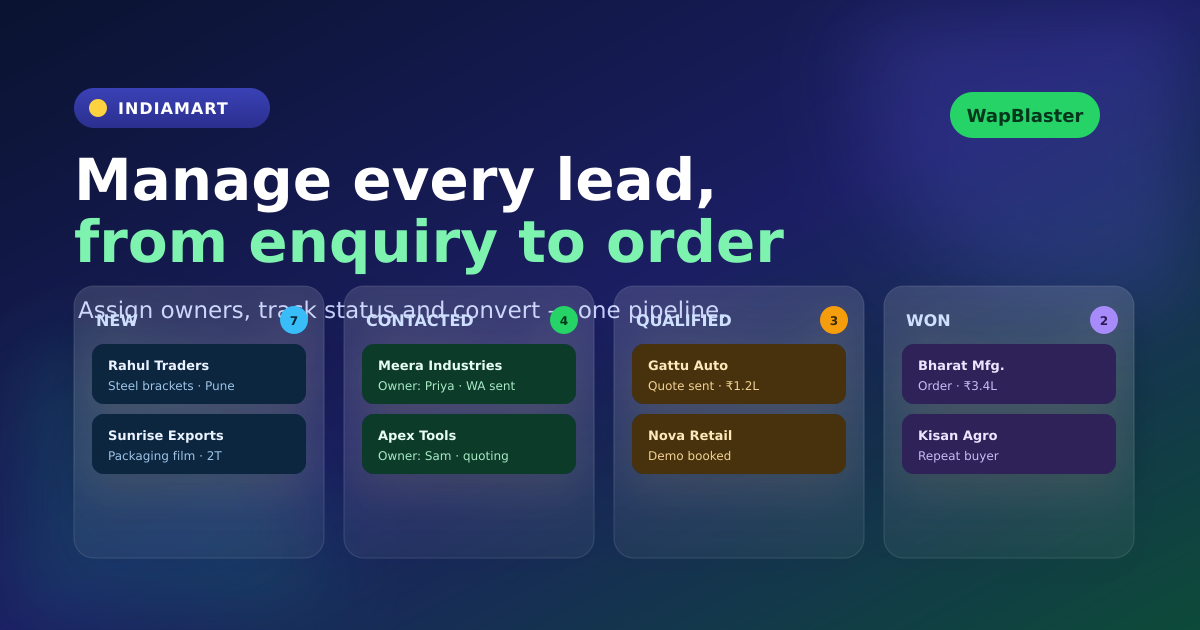
IndiaMART Lead Management on WhatsApp: How to Assign, Track and Convert Enquiries
Getting IndiaMART enquiries is only the first step. Revenue is created when the right person sees the lead, understands the requirement, replies in time, follows up with context, and records the outcome. Without a lead-management process, enquiries are easily duplicated, forgotten, or handled by multiple people with inconsistent messages.
WapBlaster brings IndiaMART lead capture and WhatsApp communication into a workflow your team can manage. New leads can be visible in one list, turned into contacts, labelled by source, updated through lead statuses, reviewed in detail, and exported when required. Combined with WhatsApp automation, this turns a marketplace enquiry into a trackable sales process.
Define what happens when a new lead arrives
Every new enquiry needs an owner and a first action. Decide whether leads are assigned by product type, territory, language, working hours, or team availability. Then define a service-level expectation: for example, an automated acknowledgement immediately and a human response within the period your team can consistently meet.
Use the IndiaMART-to-WhatsApp setup workflow to ensure lead details, contact creation, and approved first messages are configured before you ask the team to manage volume. Automation should provide clean inputs; people should provide judgement, product expertise, and accountability.
Use simple statuses that drive action
Too many lead stages create confusion. Start with a small set that your whole team understands. A workable model is:
- New: received but not yet owned or reviewed.
- Contacted: a relevant first message or call has been made.
- Qualified: the requirement, buyer fit, and next step are clear.
- Quoted or meeting scheduled: a commercial action is in progress.
- Won: converted to an order or customer process.
- Closed: not a fit, duplicate, invalid, or no longer active.
WapBlaster's IndiaMART Leads area supports lead lists, details, status updates, statistics, and export. The key is team discipline: a status should describe the current reality, not the action someone intended to take yesterday.
Keep the original enquiry next to the WhatsApp conversation
A buyer should not have to repeat product details after replying on WhatsApp. Make the original IndiaMART product or service request, message, and contact details available to the assigned salesperson. That context helps the team ask better qualification questions and reduces the risk of sending the wrong brochure, quote, or follow-up.
Where appropriate, use the automatic contact creation setting so new leads are saved with their available name, phone number, email, and an IndiaMART Lead label. Add concise internal notes after calls or important changes. Good notes make handovers possible when a salesperson is unavailable.
Assign ownership before a follow-up sequence begins
A contact group and scheduled campaign can keep an enquiry warm, but automation must not compete with the salesperson. Once a team member is actively handling a buyer, the lead should have a clear owner and the generic nurture sequence should pause or change to support that conversation.
For example, a lead that requests a quote should be assigned to a sales representative and receive quote-specific updates rather than another introductory product message. The IndiaMART WhatsApp follow-up playbook explains how to set value-led timing and stop conditions.
Use dashboards and exports to find process gaps
Managers should review more than total enquiry count. Use lead statistics and exports to answer practical questions:
- How many new leads were contacted within the expected response time?
- Which product categories create the most qualified conversations?
- Which team member or territory has the highest unresolved lead count?
- How many enquiries become quotes, meetings, or orders?
- Which sources or campaigns create leads that do not fit the business?
These questions reveal whether the constraint is lead quality, response speed, product information, pricing, or sales follow-through. Fix the constraint before increasing ad spend or message volume.
Use WhatsApp conversations to qualify, not pressure
WhatsApp is effective because it is direct and convenient for the buyer. Use it to answer questions quickly, share the right product information, and agree a next step. Avoid repeated generic messages that do not help the buyer decide. Relevance, accurate timing, and a well-informed human response are more valuable than a large number of automated touches.
For teams that need broader messaging after building a compliant contact strategy, WapBlaster's WhatsApp broadcast solution and WhatsApp Business API platform provide the foundation for organized customer communication.
Create a weekly IndiaMART lead review
A short weekly review keeps the workflow healthy. Review a sample of new, contacted, qualified, and closed leads. Look for unanswered enquiries, duplicate contacts, missing notes, and messages that do not match the buyer's stated requirement. Use these findings to improve templates, ownership rules, and sales training.
Over time, this feedback loop turns IndiaMART lead management from an inbox task into a measurable conversion system.
Frequently asked questions
How should a sales team assign IndiaMART leads on WhatsApp?
Assign leads using a consistent rule such as product category, territory, language, working hours, or team capacity. Every new enquiry should have a visible owner and a defined first action.
Can WapBlaster track IndiaMART lead status?
Yes. The IndiaMART Leads workflow includes lead list views, lead details, statistics, and status updates so teams can track progress from new enquiry through follow-up and closure.
Why should IndiaMART leads be created as contacts?
Creating a contact preserves usable lead details, supports source labels and segmentation, and helps the assigned team continue the WhatsApp conversation without losing the original enquiry context.
What metrics matter for IndiaMART lead conversion?
Track response time, contacted rate, qualification rate, quote or meeting rate, conversion rate, unresolved lead count, and the reasons leads are closed. These metrics expose operational gaps that total lead volume cannot show.
Give every IndiaMART enquiry a clear next step. Start with WapBlaster or speak with the team about your IndiaMART and WhatsApp workflow.