

How to Automate TradeIndia Leads on WhatsApp (Import, First Reply and Follow-Up)
TradeIndia sends a steady flow of buyer enquiries, but the value of each enquiry fades quickly. If a buyer contacts several suppliers and only one replies fast with a relevant answer, that supplier usually wins the conversation. WhatsApp is the most practical channel for that fast reply in India, and WapBlaster gives you the tools to turn a list of TradeIndia leads into managed WhatsApp conversations.
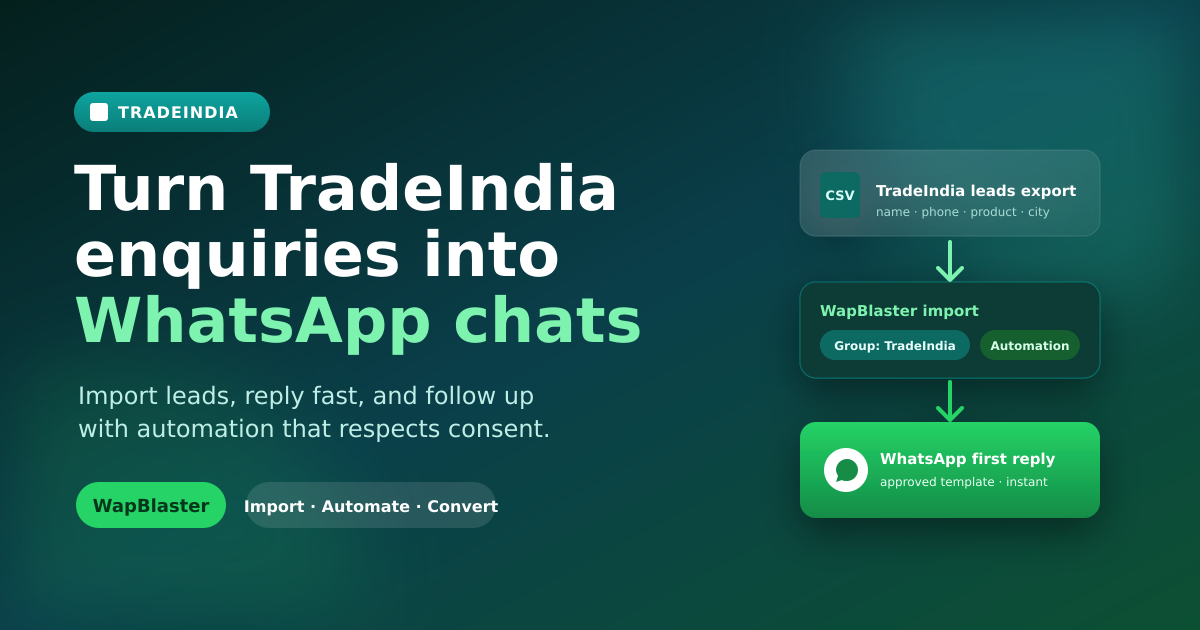
Unlike a marketplace with a one-click native connector, TradeIndia leads are usually worked from your enquiry inbox or an export. The reliable pattern is simple: collect the leads, import them into WapBlaster as contacts, send a compliant first response, and follow up with structure. This guide explains that workflow honestly, using features WapBlaster actually provides.
Start by collecting TradeIndia leads in one place
Gather your TradeIndia enquiries into a single spreadsheet with clean columns: buyer name, WhatsApp phone number (with country code), product or requirement, city, and the enquiry date. Consistent data is what makes automation useful later. A phone number without a country code or a missing product field will weaken your first message, so tidy the sheet before you import.
Only include buyers who genuinely enquired about your products. A marketplace enquiry is a reasonable basis to reply about that specific requirement, but it is not a reason to add someone to unrelated promotional blasts. Keeping your list clean protects both message quality and your WhatsApp number's quality rating.
Import the leads into WapBlaster contacts and a dedicated group
WapBlaster supports importing contacts from a spreadsheet. Import your TradeIndia sheet and map the columns to contact fields, then place everyone into a dedicated contact group such as "TradeIndia Leads". A dedicated group keeps this audience separate so you can message them with relevant content and measure results without mixing them into other campaigns.
Use labels or custom fields for the product enquired and the city. Those details let you personalise the first message and segment follow-ups later. The goal is that any salesperson opening the contact can immediately see what the buyer wanted.
Send a fast, compliant first WhatsApp response
For a business-initiated WhatsApp message, use an approved template that matches the enquiry. A strong first message confirms the product the buyer asked about, sets expectations, and invites one clear next step. For example: "Hello {{1}}, thanks for your enquiry about {{2}} on TradeIndia. Could you confirm the quantity and delivery city so we can share the right price?"
Keep it specific and useful. Do not open with a long catalogue or unrelated offers. Follow the current WhatsApp Business Platform policy, use approved templates where required, and give recipients a clear way to opt out. If you are new to the platform, the WhatsApp Business API overview explains how template messaging and sending work.
Add automation so no lead waits
Once leads are in a group, use WapBlaster automation and a WhatsApp chatbot flow to handle the opening interaction: acknowledge the enquiry, ask one qualifying question, and route interested buyers to a salesperson. Automation should speed up the first touch and qualification, while a human handles pricing, negotiation, and relationship building.
This mirrors the approach used for other marketplaces. If you also receive IndiaMART enquiries, the IndiaMART lead automation guide shows how a native integration can auto-create contacts and send the first template automatically — a useful comparison when you plan your TradeIndia process.
Give every lead an owner and a next step
Automation gets the conversation started, but people close deals. Decide who owns a new TradeIndia lead, define what "qualified" means, and record the outcome of each conversation. Keep the original enquiry visible so the buyer never has to repeat their requirement. When a buyer replies, the assigned salesperson should continue the same WhatsApp thread with full context.
Then build a structured follow-up
Most enquiries need more than one message. Rather than sending random reminders, use a short, value-led sequence and stop as soon as the buyer responds or converts. The TradeIndia WhatsApp follow-up playbook covers segmentation, timing, and compliant campaign design in detail. For reaching opted-in groups with useful updates, see WapBlaster's WhatsApp broadcast solution.
Measure what matters
Track time to first response, percentage of leads contacted, qualified-lead rate, and conversion to quote or order. If response time is fast but conversion is weak, improve qualification and product information rather than sending more messages. A clean import, a relevant first reply, and disciplined follow-up will consistently beat high message volume.
Frequently asked questions
Does WapBlaster have a native TradeIndia integration?
WapBlaster does not require a marketplace-specific connector for TradeIndia. The practical workflow is to import TradeIndia leads into WapBlaster contacts and groups, then use approved-template messaging, automation, and follow-up campaigns to manage them on WhatsApp.
How do I import TradeIndia leads into WapBlaster?
Collect your enquiries into a spreadsheet with clean columns (name, phone with country code, product, city), then use WapBlaster's contact import to map the columns and add everyone to a dedicated "TradeIndia Leads" group.
Can I message TradeIndia buyers on WhatsApp automatically?
Yes, using approved templates and automation for the first response and qualification. Keep messages relevant to the buyer's enquiry, follow current WhatsApp policy, and provide a clear opt-out.
What should the first TradeIndia WhatsApp message say?
Confirm the product the buyer enquired about and ask one useful qualifying question, such as quantity, delivery city, or required specification, so a salesperson can prepare an accurate quote.
Ready to turn TradeIndia enquiries into fast WhatsApp conversations? Start with WapBlaster or talk to the team about your lead workflow.